




IntelliPaper
Abstract
Background: Exhibitions are an activity that is often attended by many companies around the world because of its benefits as a promotional event. Companies can build the image of their company and products and interact directly with buyers through an exhibition. With recent advances in technology, virtual exhibitions have begun being created as an alternative to conventional face-to-face exhibitions. This presents an opportunity to implement other technologies within these new type of exhibition, namely generative artificial intelligence.
Methods: This research involved the use of the Unity game engine to create a virtual environment resembling an exhibition space. Within this environment users can navigate their surroundings and view the products displayed at the exhibition. Generative artificial intelligence was then implemented to generate content based on the products available in the exhibition. A head mounted display and virtual reality controllers were used to view and control the application. Participants were instructed to test the application. Once done, they then filled out a user acceptance test in order to evaluate their experience of using the application and how the use of generative artificial intelligence impacted that experience.
Results: Five participants tested and evaluated the application. The implementation of generative artificial intelligence had a positive impact on the quality of the information provided by the application. In addition, it did not impact the immersion of the experience.
Conclusions: Generative artificial intelligence can be used in a virtual exhibition setting to dynamically generate content regarding available products.
Explore Digital Article Text
I. INTRODUCTION
Exhibition activities are a promotional event that is often followed by many companies and visited by many visitors all over the world. This activity is where companies can display products and services offered directly to exhibition visitors. There have been many exhibitions that have been held and new exhibitions continue to be held until now. There are several factors behind why many companies are willing to participate in exhibitions. Exhibitions provide opportunities for companies to build and improve the image of the company and products with consumers [1]. In addition, exhibitions provide an opportunity for companies to meet and interact directly with visitors in promoting them. Visitors can also interact with the products they are interested in and ask about the products [2].
However, there are some drawbacks experienced by companies and visitors when participating in exhibition activities. For companies, participating in exhibitions is something that requires significant expenditure. Capital will need to be spent to pay for things like exhibition employee salaries, venue rental prices, exhibition stand construction, and other promotional materials [3]. All of these costs make exhibition activities one of the largest expenses in many companies' promotional strategies [4]. Large exhibitions are also often crowded and crowded, which can make the experience confusing for both companies and visitors [5]. And, visitors will be limited in which exhibitions they can attend due to factors such as exhibition capacity, exhibition location, and exhibition operating hours.
Seeing the drawbacks of conventional exhibitions, the idea came up to build a virtual exhibition system using virtual reality technology. This system can bring a number of advantages for companies compared to conventional exhibitions. The costs spent will be cheaper [6]. This is because building stands or paying exhibition staff is no longer required. The benefits received for the costs incurred will also be valid for a longer period of time. They will not be limited to just a few days as with conventional exhibition periods. Products and services can also be updated according to company needs. In addition, a virtual exhibition can be offered throughout the world in countries that are initially difficult to reach using conventional exhibitions [6].
The use of virtual reality and artificial intelligence technology will also enhance the virtual exhibition experience with its own advantages. Virtual reality does this by allowing users to interact with the information in the application more naturally [7]. The use of virtual reality can create an experience as if the user is visiting a real exhibition. Artificial intelligence can be used to generate high-quality content [8]. This can be used to help fill the application content and provide the information that users want.
However, virtual exhibitions have their own drawbacks. Companies that participate in virtual exhibitions find it difficult to measure the effectiveness of their marketing activities. Companies also find that interaction with visitors is more difficult to do in a virtual exhibition. It was found that direct interaction and follow-up contact with visitors is not as easy as compared to conventional exhibitions. And, the experience of visitors to virtual exhibitions also depends on the quality of the technology used such as hardware or visitor bandwidth [6]. Although virtual exhibitions have several drawbacks, the creation of a virtual exhibition system will give companies and visitors additional choices in how to participate in exhibition activities. These additional choices can help facilitate participants based on their individual needs.
Similar research regarding virtual exhibitions has been carried out previously by a research paper titled "Evaluation of virtual tour in an online museum: Exhibition of Architecture of the Forbidden City" [9]. In it, a virtual tour of an online museum exhibition was constructed where users can move to pre-determined locations using movement buttons. User evaluation done in this research found that although the application was able to create a good sense of reality, the interactivity and methods of navigation in the application were found to be lacking. Another research paper titled "Efficacy of Virtual Reality in Painting Art Exhibitions Appreciation" created a virtual art gallery using virtual reality technology which was then also evaluated by user testing [10]. This research found that the use of virtual reality can be suitable for creating virtual art exhibitions. One more research paper titled "Virtual Reality Exhibition Platform" created virtual environments to represent a virtual exhibition which was done with the implementation of virtual reality [11].
However, the research papers previously mentioned are lacking in some areas. The first research paper did not implement virtual reality technologies in its virtual exhibition. There is also a difference in the type of exhibitions being made. The first research paper created a virtual museum tour while the second created a virtual art gallery. These are different from the type of exhibition that this research paper would like to explore, namely the ones in which companies can market their products and services. The third research paper successfully created this type of exhibition. However, it did not conduct any user testing and evaluation to see the efficacy and levels of user satisfaction of the application.
As such, this research aims to design and build a virtual exhibition system which uses virtual reality and artificial intelligence technology. This research also aims to measure the level of user satisfaction towards the virtual exhibition application. This paper will first discuss a literature review regarding topics related to the research. The methodology of the research and how it was carried out will then be laid out. The results and findings of this research will be discussed next followed by conclusions that can be taken from this research.
II. LITERATURE REVIEW
2.1. Virtual Exhibitions
Virtual exhibitions are often referred to as digital exhibitions, online exhibitions, online galleries, exhibitions in cyberspace. By using virtual exhibitions, exhibitors can develop the material presented in a broader and more lasting manner to attract the interest of exhibition visitors. In addition, the use of virtual exhibitions can save production costs, such as saving on insurance, shipping and installation costs [12]. And, virtual exhibitions can reach more people than conventional exhibitions. This is because everyone can access the information they need, as long as they have a computer or another device. Virtual exhibitions are also not limited by exhibition opening or closing times and can be available 24 hours unlike conventional exhibitions [13].
In the current era, conventional exhibitions that are usually held by museums, libraries and other cultural organizations have now begun to switch to virtual exhibitions. This is because there are many benefits that can be obtained, such as convenience and cost savings. Virtual exhibitions can also be carried out via online video, streaming, social media, or via online chat. Each virtual exhibition method has its own advantages and disadvantages [14].
2.2. Virtual Reality
Virtual reality is a technology that implements a virtual 3D environment that users can navigate and interact with [15]. The nature of virtual reality makes it different compared to other forms of digital media. Users are more involved in the virtual reality experience and can interact with information more naturally in the virtual world [7]. This is because virtual reality can provide an experience that feels more real [16]. Several different types of hardware are required to be able to use virtual reality. This includes stereoscopic displays, input devices, motion tracking hardware, and desktop/mobile platforms [17].
Virtual reality is often used by developers in various fields such as education, health and entertainment [18]. The adoption of virtual reality technology occurs because of a number of benefits obtained from its use. For example, the use of virtual reality can have a positive impact on students' ability to absorb learning materials [19]. The main advantage that virtual reality has is the freedom it gives users in the way they interact and navigate their virtual environment. This helps create a more realistic and natural experience for users [20].
2.3. Non-Player Character
A non-player character is an interactive agent that is not controlled by the user. Instead, they are controlled by the AI system in the application or system where they are implemented. The behavior and actions of a non-player character can be determined rigidly or created dynamically as the application progresses based on the design and algorithms used [21]. There are several functions that can be fulfilled using non-player characters. They can be used to teach users about features or mechanics in a game or application. They can act as allies who can help the user or enemies who will fight the user. They can also be neutral characters in virtual environments that can help contribute to atmosphere and realism [22].
One popular way that is often used to control non-player characters is to use finite state machines [23]. In a finite state machine, non-player characters will have several predetermined actions or behaviors that are represented as a state. The non-player character will then transition from one state to another when an input is received or a condition is met. Another way to implement non-player characters is to use behavior trees. A behavior tree consists of nodes that are connected in one direction to each other. Behavior trees start their execution from the root node which acts as the first node. After that there are several different nodes that can be used to model the desired behavior such as fallback, sequence, parallel, decorator, action, and condition nodes [24].
2.4. Generative Artificial Intelligence
Generative artificial intelligence refers to artificial intelligence systems that have the ability to create new pieces of media through the use of generative models [25]. Generative artificial intelligence is a section of AI that has been gaining widespread use over recent years. One example of its use is the implementation of generative artificial intelligence in natural language processing. With this generative artificial intelligence can be used to process, interpret, as well as generate text [26]. Another way generative artificial intelligence is commonly used is in the creation of images. Text-to image generative models have made it possible to create images by entering a text prompt describing what image should be generated [27].
There are many different types of generative artificial intelligence that have been developed. One popular example of these different types are generative adversarial networks. Generative adversarial networks involve two competing neural networks, a generator and a discriminator. The generator is used to generate new samples while the discriminator judges samples to determine whether they are real or fake. These networks compete with each other in order to keep improving the samples generated by the generator until eventually it can no longer be distinguished from real samples by the discriminator [28].
III. METHOD
In this research, virtual reality and artificial intelligence technologies were used to create a virtual exhibition application. The initial stage in creating this application was conducting a literature review to gather information on subjects related to the study. Virtual reality, non-player characters, virtual exhibitions, and generative artificial intelligence were among the subjects covered in the literature review. The information gathered was then utilized to guide the research.
Flowcharts were then used to design the application. The primary purpose of flowcharts was to define the functionality of the application and its features, as well as the methods in which users would interact with them. The application was designed with the use of six flowcharts. These include flowcharts for the main application, main gate, choice category, car search, non-player character, and chatbot features within the application.
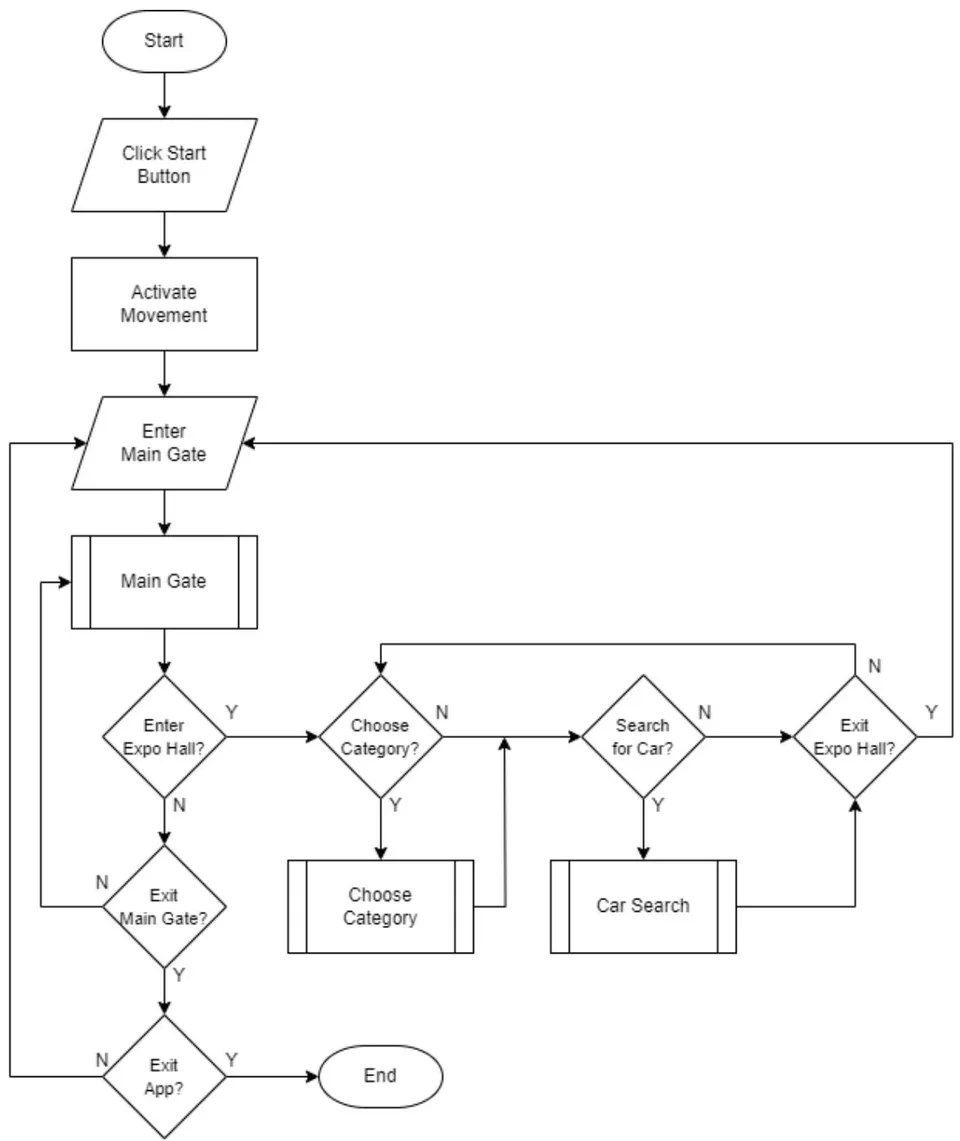
The main application flowchart explains the flow the application operates and how the user will interact with the application. It describes which features of the application that the user can engage with and in what sequence including the main gate, choose category and car search features. The main application flowchart can be seen in figure 1.
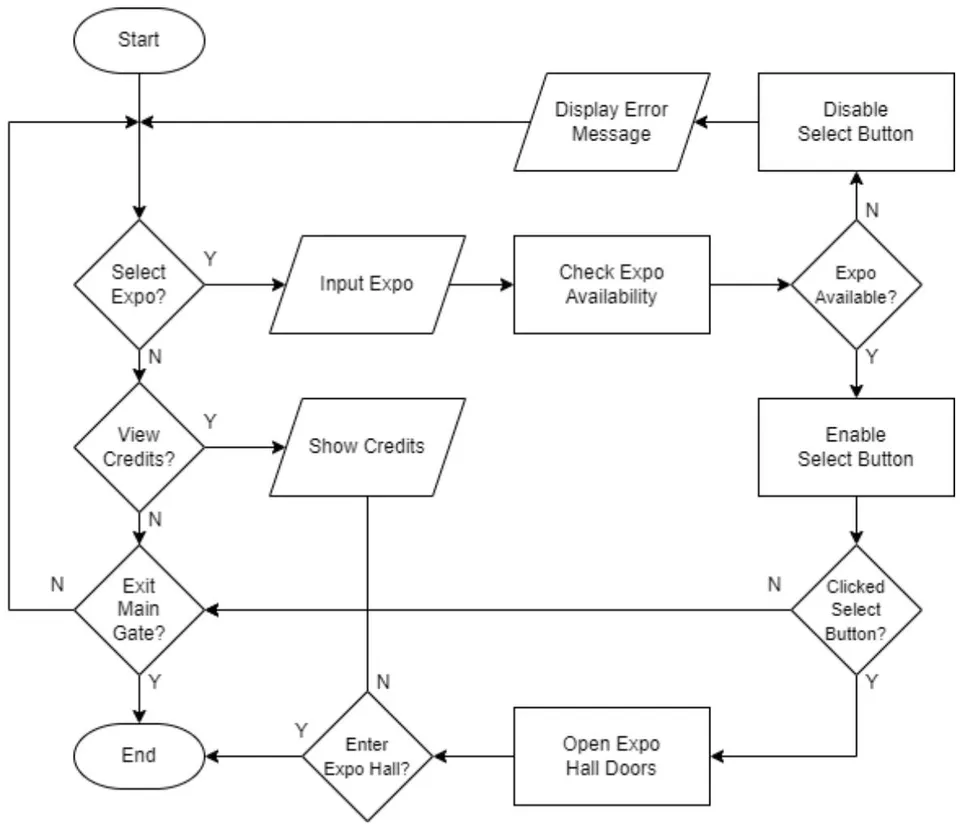
What the user can accomplish in the application's main gate area is explained in the main gate flowchart. The primary function of the main gate is to allow visitors to select the exhibition they wish to view. Following the selection of an exhibition, the application will determine whether or not it is open for visits. The credits section is an additional part of the main gate where list of all the resources used to create the application is displayed for users to view. Figure 2 shows the flowchart for the main gate.
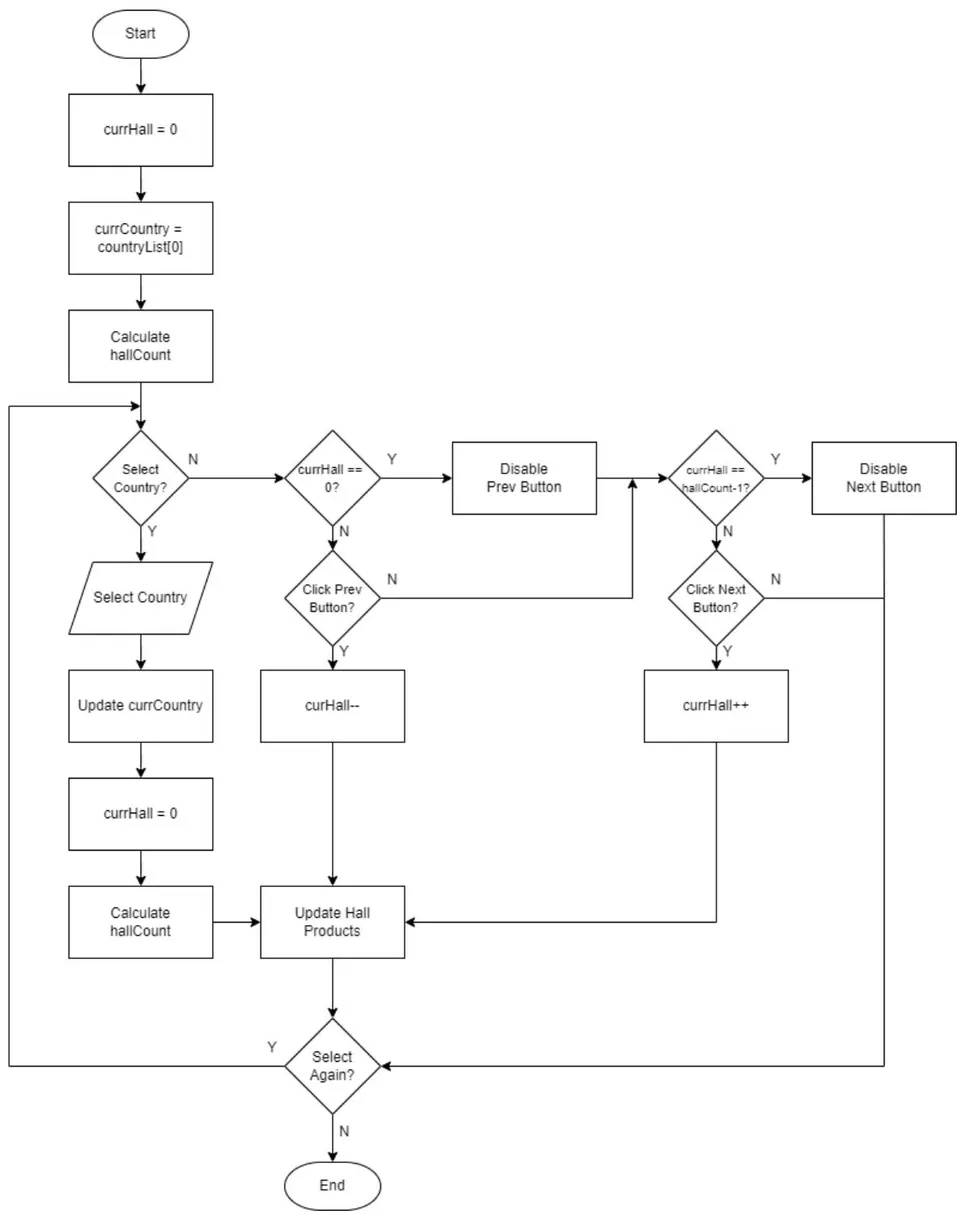
For the category selection function, the choose category flowchart was created. Users can alter the products on display in the exhibition hall here. There will be a variety of products linked to each category, which in this case are countries. The exhibition hall will use the display stands to showcase its items after a category has been chosen. Depending on how many display stands there are at the show, the products in a category will be divided into separate halls. For instance, a category with 13 products will be divided into two halls: one for the first eight products and another for the last five. After then, users can switch between the halls in a category by pressing the previous and next buttons. The choose category flowchart can be seen in figure 3.
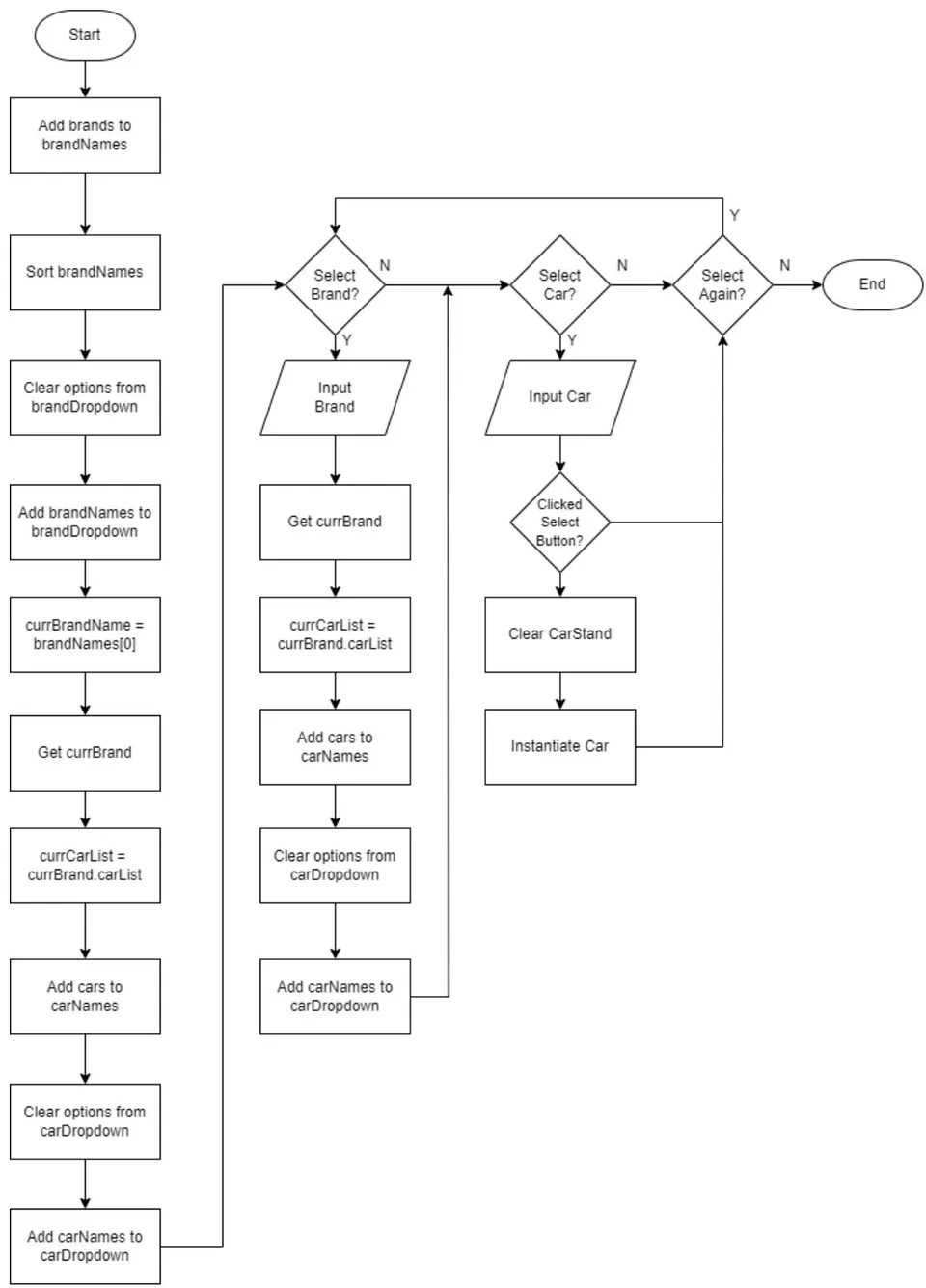
The car search flowchart was used to design how players can search for a specific product within the application. Users can use two distinct dropdown lists to look for a specific product. The brand to which the product belongs is chosen from the first list. Selecting a brand from this list will change the second dropdown list's contents to include all of the chosen brand's products. After that, users can view the product by choosing it from the second selection. Figure 4 shows the flowchart for the car search.
The purpose of the non-player character flowchart was to map out how non-player characters would behave within the application. It primarily relates to how they move through the virtual environment. The virtual environment contains pre-established checkpoints within it. After selecting one of these waypoints at random, the
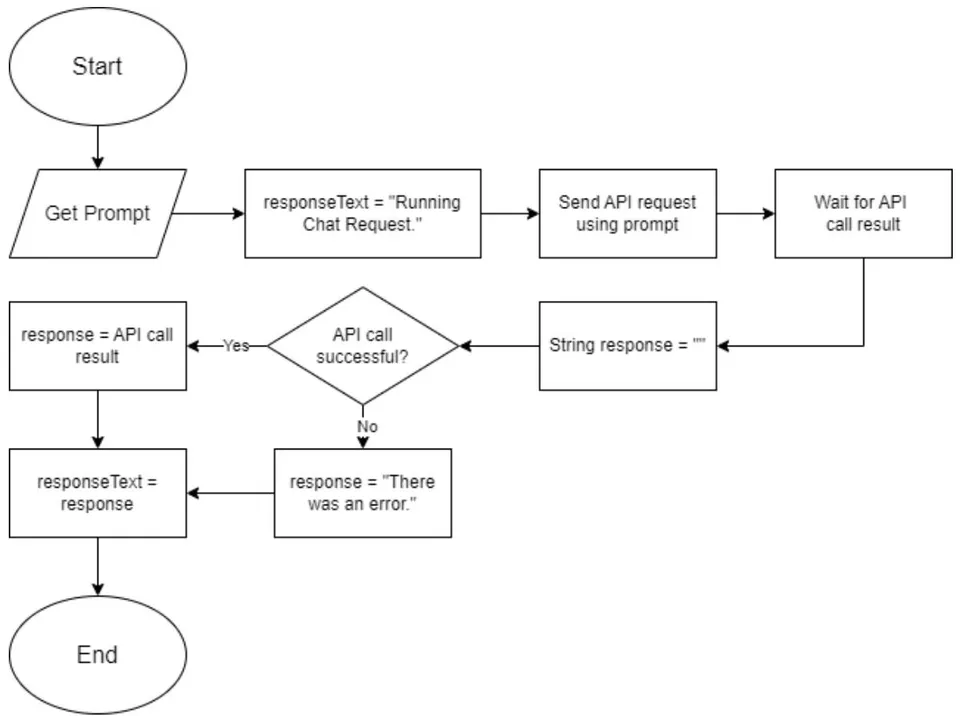
non-player character can begin moving in its direction. The non-player character's distance from its goal will be continuously measured. The non-player character will select a new one at random after reaching its destination if the distance is low enough. Figure 5 shows the flowchart for the non-player character. The Gemini API flowchart was made to represent how the Google Gemini API will be used in the application. The application will first receive a prompt from the user. The response text is then changed to "Running Chat Request" to inform the user that their prompt is being processed. An API call is made using the prompt and the application will wait for the result of the API call. The response string variable is also created with an
empty value. The application will then check whether the result of the API call was successful or not. If the API call was successful, the response variable is assigned the value of the API call result. If the API call was unsuccessful, the response variable is assigned the value "An error occurred." The response text is then replaced with the value of the response variable. The flowchart can be seen in figure 6.
Application development was later carried out using the Unity game engine. Development involves implementing the designs that have been made. Various Unity packages were used in the making of the application. The Unity XR Toolkit package was used to create the movement system allowing players to walk, turn and teleport. It was also used to create the interaction system which allowed players to interact with objects and UI using the virtual reality controllers. Other packages such as Probuilder and Terrain Tools were used to create the virtual environment of the application.
The application that was developed took the form of a 3D virtual environment. Users can navigate this virtual space and interact with the objects within it. The application required the use of virtual reality hardware in order to be used. The Oculus Rift headset and controllers were used for development and testing purposes in this research. The virtual reality headset was used in order to display the application to users and to rotate the in-game first-person camera. The controllers on the other hand were used by users to navigate and move around in the virtual environment of the application.
Evaluation was carried out by having users try the application directly using virtual reality hardware such as headsets and controllers. A brief explanation was given regarding the application and how to use the hardware. Users will then use the application and try all the features on it. Documentation of the testing process carried out by users can be seen in figure 6. After users have finished trying the application, they will fill out a questionnaire to provide their level of satisfaction with the application. Testing and evaluation was carried out by a total of 5 users.
IV. RESULTS AND DISCUSSION
4.1. Development Results
This research has succeeded in building a virtual exhibition system using virtual technology. Application development was carried out using the Unity game engine. The application created has several main features, namely a movement and interaction system, exhibition features, an audio system, and non-player characters.
The movement and interaction system is how users can interact with the virtual world that has been created in the application. The movement system in the application is what allows users to traverse the virtual environment. Meanwhile, the interaction system facilitates users in interacting, influencing and obtaining information from the application. Because the application is built based on virtual reality technology, users will use a special controller as the main way to enter input into the application.
There are several different methods that can be used to move within the application. The left-hand controller functions to move forwards and backwards. To rotate left and right, users can use the right-hand controller or the virtual reality headset. Apart from that, the right-hand controller can also be used to teleport where users can adjust their position and rotation instantly. Figure 7 shows the use of the teleportation system in the application.
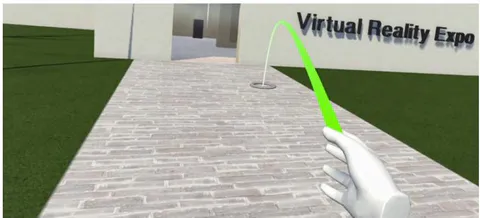
Figure 7: The Teleportation Feature
There are also several ways in which users can interact with objects in the application. Interaction is mainly carried out using the left and right controllers which act as the user's hands. The desired interaction with an object can be done directly, such as holding the object in a user's hand. Users can also use a ray coming out of their hands to interact with objects and the UI. This can be seen in Figure 8. Interaction with objects uses the grip button on the controller while interaction with the UI uses trigger button.
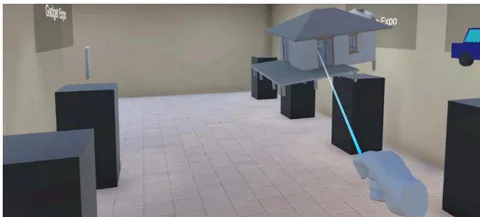
Figure 8: Interacting with Objects using a Ray
The exhibition features discussed are features that can be used by users in virtual exhibitions on the application. The features created are the result of implementing the designs produced at the design stage. They cover how a user can use the application as a virtual exhibition. Included in this is how users can select the exhibition they want, view the desired product, and view information about a product.
The exhibition selection feature is a way for users to select the exhibitions they want to visit. This is done at the main gate section of the exhibition building. The selection is made by taking an object that represents an exhibition and placing it on the selection table. If the selected exhibition can be visited then the button next to the entrance will turn green. If the exhibition cannot be visited then the button will turn red and an error message will appear once the button is pressed. This can be seen in Figure 9. Only the car exhibition can be visited at this time.
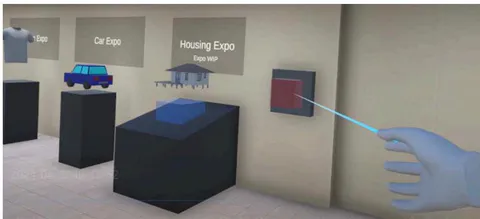
Figure 9: Choosing an Exhibition that is Not Available
The product selection feature is how users can search for the products they want at the exhibition. Users can do this by changing the contents of the exhibition space. The products at the exhibition are divided into several categories that users can choose from. Each category will then have several rooms that can be selected to change the contents of the exhibition space. In the car exhibition, the cars are divided based on their country of origin. After selecting a category, users can select the room or hall they want to view. With this, the contents of the exhibition room will change to show the cars in the selected hall. The category selection table can be seen in figure 10.
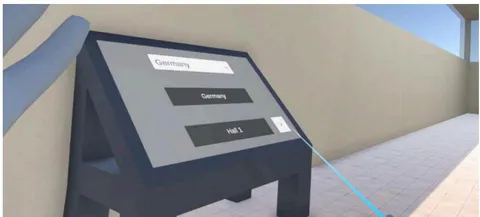
Figure 10: Category Selection Table
Selection can also be done individually with the product search feature which can be seen in figure 11. With this, users can search for products more specifically. In the car exhibition, the search feature functions by using a dropdown list containing all car brands in the application. Users can then select a desired brand. This action will add all products from that brand to the second dropdown list. Users can then select the products they want from the second dropdown list to make them appear.
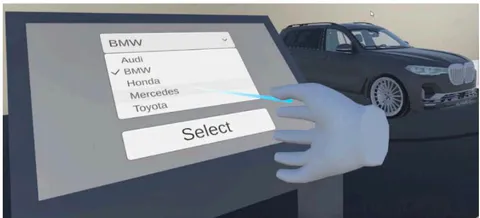
Figure 11: Product Search Feature
Then there is the feature in the exhibition that function to provide information about a product. This feature facilitates users in finding information about the products they are interested in. At the car exhibition, information about a car is shown on a screen on the stand
occupied by the car. The screen shows information about the car such as its name, dimensions, price, etc. Users can press buttons at the bottom of the panel to change the information displayed. The information screen display can be seen in figure 12.
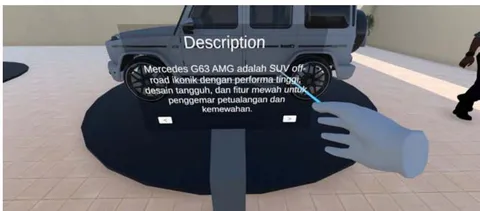
Figure 12: Product Information Feature
An audio system was developed in the application to make the application produce sound when used. The sound in the application comes from objects in the environment. Sounds can be played when the user interacts with an object. For example, there will be a sound when the user picks up and releases an object. There are also sounds that play continuously such as the music in an exhibition hall.
The application uses two different types of audio, namely 2D audio and 3D audio. 2D audio is audio that is always played at the same volume. An example of using 2D audio in an application is for UI such as buttons and dropdown lists. 3D audio is audio that is played at a dynamic volume. The volume of 3D audio depends on the distance between the sound source and the user's position in the environment. 3D audio is used for things like the music in the exhibition hall and the sound of footsteps belonging to non-player characters.
The non-player character or NPC feature in the application refers to characters who are controlled by the user. These characters are controlled by the application that will give instructions to regulate their behavior. With this, the movements of non-player characters are carried out independently without input from the user. Non-player characters are used in the app as a way to simulate the presence of other visitors at the exhibition.
Navigation by non-player characters is carried out using the AI navigation system provided by Unity. In this system, a NavMesh is used to mark areas that can be traveled by non-player characters. The shape of NavMesh can be modified using other components such as NavMeshObstacle and NavMeshVolumeModifier. The non-player character can then plan a path to a destination located in the NavMesh. Several destination points are spread across the exhibition room and are chosen by non-player characters at random. All this can be seen in figure 13 where the blue area is the NavMesh and the yellow dots are the destination points. Once selected, the non-player character will start walking towards that point. A new point will then be selected once the non-player character successfully reaches their destination.
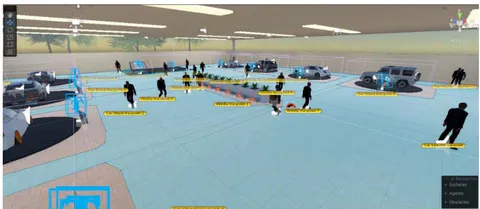
Figure 13: Navigation System for Non-Player Characters
In addition, there are other non-playable characters in the form of guards and salespeople. These non-playable characters serve to provide the users with information. The guard characters' function is to provide the user with information regarding the application. There are two guards within the application. The first guard is located in the main gate room. Users can ask the first guard questions about how to use the application such as how to interact with objects or teleport. The second guard is located in the exhibition room. Users can ask the second guard questions
about exhibition features such as the car search feature or interaction with cars. Then there are the salespeople non-playable characters. The salesperson character is located at each car stand that has a product on display. The salesperson is used to ask questions about the cars on the stand. The salesperson starts with the user making a selection using the grip button on their controller. The salesperson will then check if the user also presses the trigger button while the grip button is being held to activate. If not, the salesperson will run the text to speech feature. If the trigger button
is also pressed, the salesperson will display the chat panel if it is not already displayed and close it if it is already displayed. In the chat panel, the user can use the AI Chatbot feature to ask the salesperson questions about the cars displayed on the stand. Figure 14 shows a salesperson character within the application.
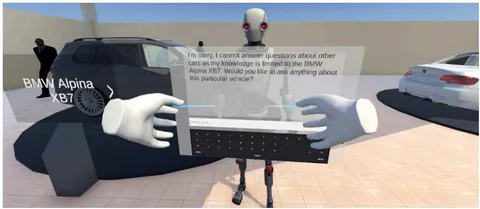
Figure 14: Salesperson Non-Playable Character
An AI Chatbot feature is developed using the Google Gemini API. The resulting AI Chatbot is a table where users can type the desired prompt and get an answer based on what is entered. The AI Chatbot display can be seen in Figure 15. To enter a prompt, the user first needs to select the input column using the virtual reality controller being used. After that, the user can type the desired prompt using the virtual keyboard provided on the AI Chatbot. When the user presses the Enter key, the typed prompt will be sent to the Google Gemini API. Google Gemini will then generate a response using the prompt provided by the user. This response will be sent back to the application and displayed by the AI Chatbot table.
The Google Gemini API is also used to display information about the cars at the exhibition. Each
car is stored in the application as a scriptable object. This scriptable object contains data about a car such as the name, make and 3D model of the car. This data is used to send a prompt about the car to the Google Gemini API. The application will prompt about the description and features for each car. The text generated by Google Gemini will then be displayed on each car stand.
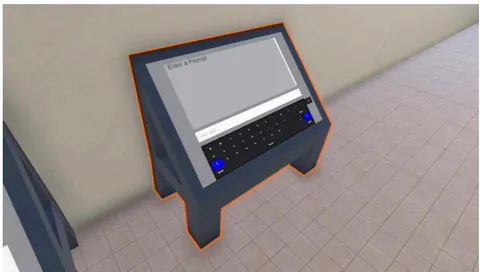
Figure 15: AI Chatbot Feature
4.2. Analysis of Evaluation Results
Evaluation results from the questionnaire that was filled out by users were analysed by calculating the mean values. The mean of the answers given by users is calculated by dividing the total score of all answers by the number of answers. To calculate the total score for an answer, all the values given by users will be added up based on their respective value weights. The final score is then calculated by adding up the means of each answer and dividing it by the number of answers in the questionnaire. The results of the user evaluation can be seen in table 1.
The total score is calculated using the following formula:
The mean is calculated using the following formula:
The final score is calculated using the following formula:
| Questions | Number of Responses | Mean | |||||
| 1 | 2 | 3 | 4 | 5 | |||
| Is the visual quality of the application good? | 0 | 0 | 0 | 2 | 3 | 88% | |
| Is the quality of the movement system in the application good? | 0 | 0 | 0 | 1 | 4 | 96% | |
| Are the interactions with objects and UI in the application good? | 0 | 0 | 1 | 3 | 1 | 80% | |
| Is the audio quality of the application good? | 0 | 0 | 1 | 3 | 1 | 88% | |
| Is the quality of the content in the application good? | 0 | 0 | 0 | 0 | 5 | 100% | |
| Is the information provided on products informative? | 0 | 0 | 0 | 0 | 5 | 100% | |
| Is the application intuitive and easy to use? | 0 | 0 | 1 | 2 | 2 | 84% | |
| Is the experience of using the application immersive? | 0 | 0 | 0 | 2 | 3 | 92% | |
| As a whole, are you satisfied with the application? | 0 | 0 | 0 | 1 | 4 | 96% | |
| Final Score | 91.6% | ||||||
With this, it can be interpreted that the virtual exhibition that was made had been received well by those who tried it. This is supported by a high final score of . Users gave the highest score to the quality of the content and product information in the application with an average score of . Meanwhile, the lowest score was given to the audio quality and user interaction with the objects and UI in the application. It can be concluded that the quality of the content in the form of exhibition products and the implementation of the Google Gemini API to display product information is quite good. However, the quality of the interaction system, UI display, and audio can still be improved.
The results of this research differ from those of the virtual museum tour that had been previously discussed. The application that has been made performs better in terms of interactivity and immersion. This could come down to the less restrictive methods of navigation used as well as the use of virtual reality technology. With these results it can be said that this research has done well in creating a well-functioning virtual exhibition application which implements virtual reality technology and in measuring user satisfaction towards the application. The study is limited however in the users that were collected for evaluation purposes. Only 5 users were able to be found for this research. And, there is a lack of diversity in the types of users with them all being university students within the same age group.
This research aimed to design and build a virtual exhibition system using virtual reality and artificial intelligence technology and to measure the level of user satisfaction towards the virtual exhibition application. With the carrying out of this research, user sentiments towards attending virtual exhibitions using virtual reality and artificial intelligence can be examined. Judging by the results, it would appear that users are open and willing to adopt the idea. There are still questions to be held about the viability of hosting virtual exhibitions in this manner as this research only focused on the visitor side of things. How companies and brands feel about participating in these virtual exhibitions and whether the exhibitions can perform as well as conventional exhibitions still remain unanswered.
V. CONCLUSION
This research has been successful in designing building a virtual exhibition system using virtual reality and artificial intelligence technology. After testing with 5 users using the user acceptance test method and Likert scale, the user satisfaction level was found to be , which shows that users are very satisfied with the application that was built. Based on this value, it can be interpreted that users generally accept that the system has been created well. These results support the feasibility of using the virtual exhibition system based on virtual reality technology that has been produced. This provides justification to any interested in carrying out such exhibitions. The virtual exhibition that was produced also performed better in terms of immersion and navigation compared to other exhibitions which do not use virtual reality and artificial intelligence. This suggests that the implementation of virtual reality technologies played a role in enhancing the user experience and that it could perhaps be applied to enhance other virtual experiences. To further test the viability of virtual exhibitions using virtual reality, more research can be done regarding their performance for the businesses who decide to take part in them. This research has been successful in designing building a virtual exhibition system using virtual reality and artificial intelligence technology. After testing with 5 users using the user acceptance test method and Likert scale, the user satisfaction level was found to be , which shows that users are very satisfied with the application that was built. Based on this value, it can be interpreted that users generally accept that the system has been created well. These results support the feasibility of using the virtual exhibition system based ON virtual reality technology that has been produced. This provides justification to any interested in carrying out such exhibitions. The virtual exhibition that was produced also performed better in terms of immersion and navigation compared to other exhibitions which do not use virtual reality and artificial intelligence. This suggests that the implementation of virtual reality technologies played a role in enhancing the user experience and that it could perhaps be applied to enhance other virtual experiences. To further test the viability of virtual exhibitions using virtual reality, more research can be done regarding their performance for the businesses who decide to take part in them.
ACKNOWLEDGEMENTS
This research was made possible by the funding and support provided by Universitas Multimedia Nusantara.
Conflict of Interest
The authors declare no conflict of interest.
Ethical Approval
Not applicable
Data Availability
The datasets used in this study are openly available at [repository link] and the source code is available on GitHub at [GitHub link].
Funding
This work did not receive any external funding.
Cite this article
Related Research

Special Issue
Launch a focused special issue to highlight research, emerging trends, and expert insights in your academic field.